Platform feature update completed on July 10th, 2025
New
Sales Tax
Settings
August 11, 2026
🚀 Smarter, Sleeker Quotes and Orders Emails Experience
✨ What’s New?
We’ve made sending quotes and orders smoother, cleaner, and much more trackable. Say goodbye to manual copy-pasting signatures and hard-to-read emails. Here's what's new and where it happens:
1. Insert Signature Dropdown
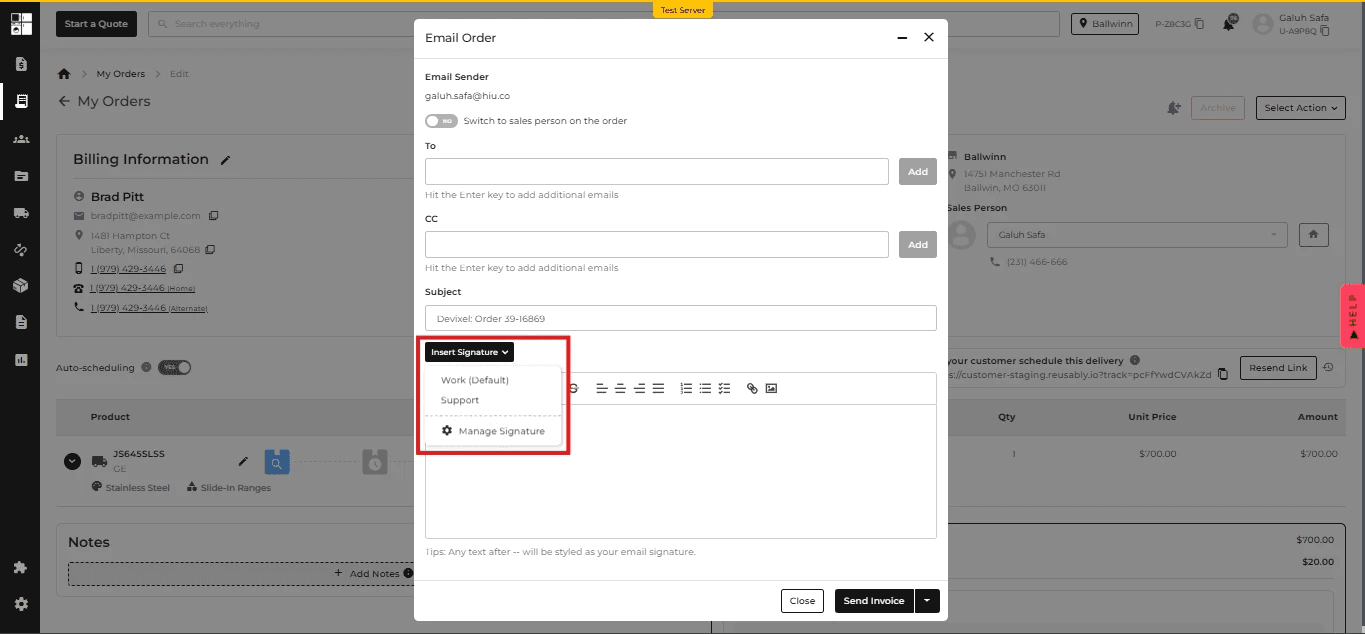
Now you can instantly insert your preferred email signature when sending Quotes or Orders — no more manual pasting!
📍 Where: Quote/Order → Email → Pop-up → Insert Signature
How it works:
Click the Insert Signature dropdown
Choose your signature
Click the Manage Signature button to manage your saved signatures with one click
2. Smart Signature Styling
We’ve added a clean way to differentiate your main message from your signature.
📍 Where: Email Body Editor
Magic Rule:
Type -- then write your signature → it auto-styles in light grey
💡 Tip appears below the editor:
“Any text after -- will be styled as your email signature.”

3. Better Signature Management
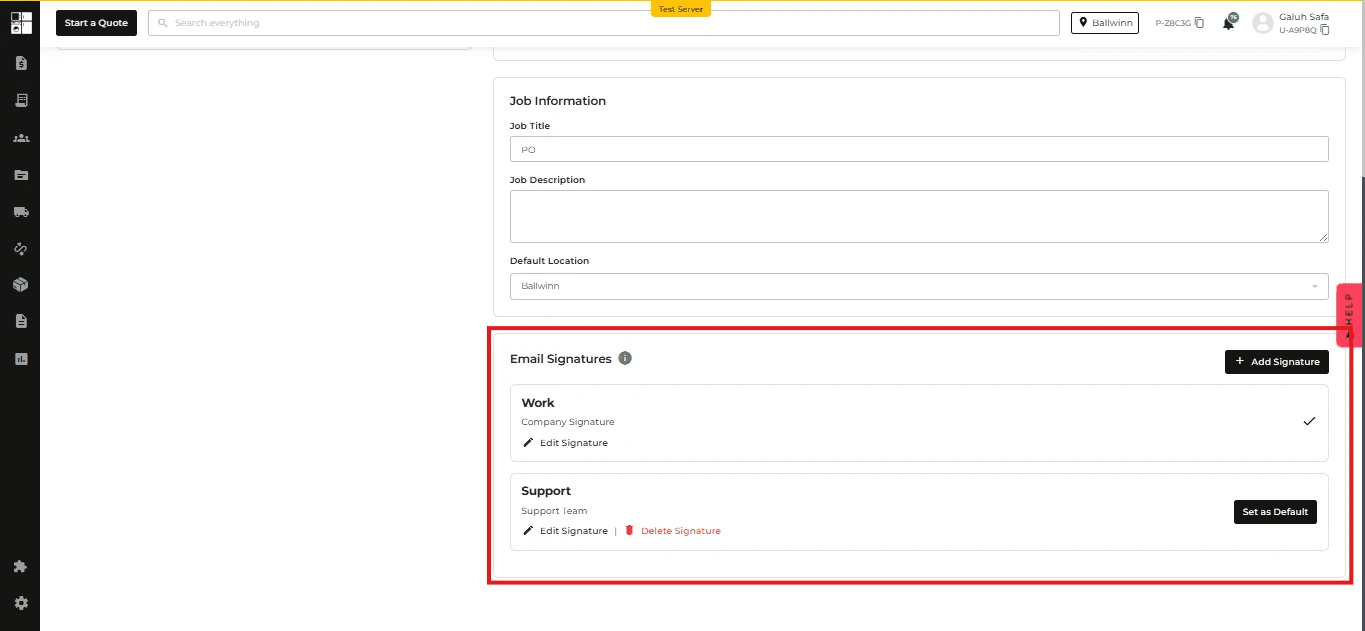
Create and customize multiple signatures directly from your profile.
📍 Where: Profile Settings → Under Job Information
You can now:
✅ Add multiple signatures
🏷️ Label each one (like “Support”, “Sales”, etc.)
⭐ Set one as your default
🖋 Supports rich text: bold, links, line breaks, colors, and images.

4. Email Readability Upgrade
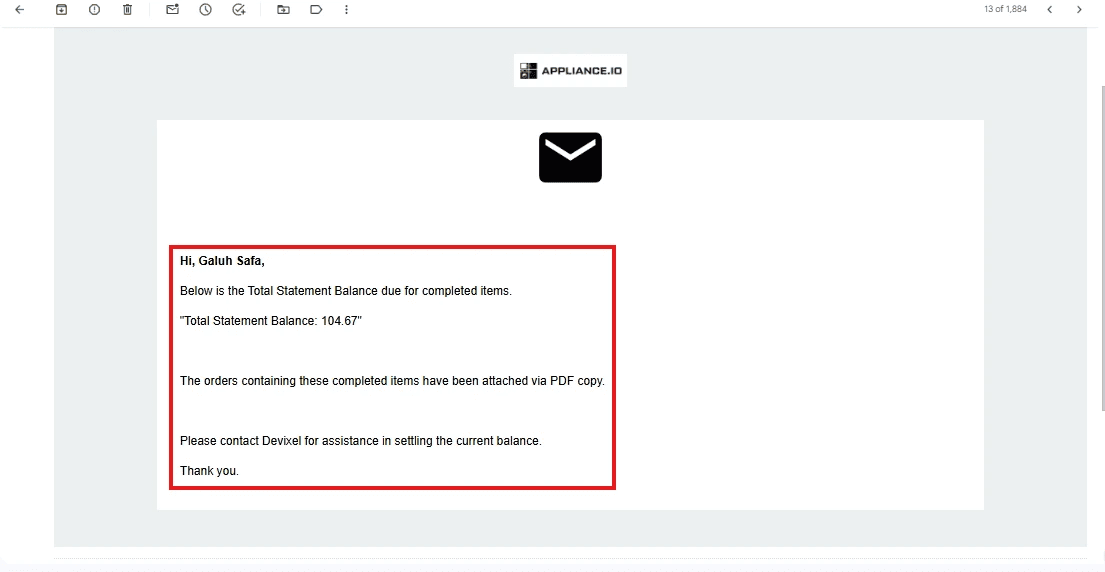
We’ve made all customer-facing emails easier to read.
📍 Applies To: All outgoing emails to customers
Font color changed from light grey to bold black
Clean, professional, and readable every time

⚙️ Why It Matters
Previously, adding a signature used to be a hassle and was often forgotten. Now:
It's fast 🏎️
It’s consistent ✍️
It’s trackable 📩
Keep every customer email on-brand and polished, effortlessly.
🚚 Routing Just Got Smarter: Manual Stop Magic Is Here!
📍 Where: Routing Page → Unrouted Stops Section
🆕 What’s New:
1. Add Manual Stop (Fast & Easy)
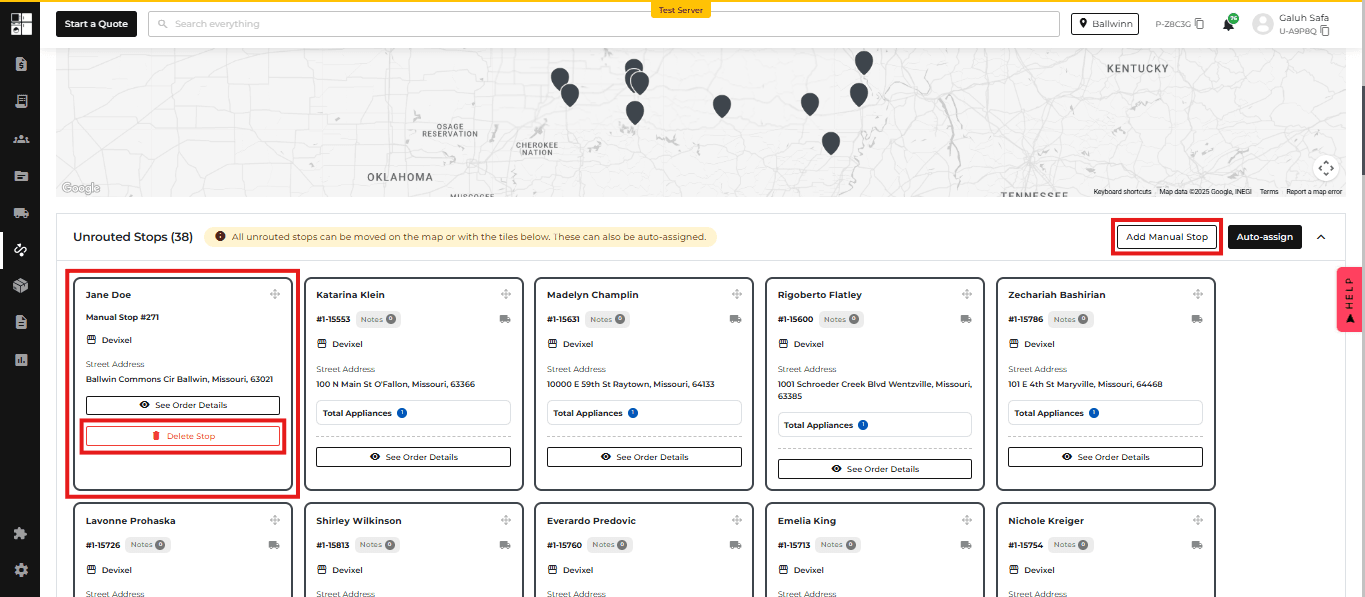
No more hassle! You can now add a Manual Stop directly from the Unrouted Stops section with the new “Add Manual Stop” button.
Find it next to the Auto-Assign button.
2. Instantly Appears in Unrouted
Once added, the stop will pop up in the Unrouted Stops section, ready for:
✅ Auto-Assign
🖱️ Drag & drop on the map
Just like your regular imported stops—no more manual detours.
3. Clean Up with Delete
Need to change your mind? You can delete Manual Stops directly from the Unrouted Stops section. Easy cleanup, no fuss.
⚙️ Why It Matters:
This change saves dispatchers time and reduces errors during routing, especially when adding last-minute or missed stops.

🧩 New Update: Brand-Based Pricing Visibility Control
📍 Where: Product Pricing Settings (Per Brand)
We’ve made it easier for you to manage how product pricing appears on your e-commerce site — now per brand! 🎉
🆕 What’s New?
You can now hide pricing on your website for specific brands and guide customers to contact you instead. Perfect if you want to handle quotes manually or tailor prices.
⚙️ How It Works:
New Toggle: "Hide Pricing on Website"
📌 Found in the Product Pricing Settings (per brand)
When the toggle is ON, you'll see:
📝 Custom Message Field
Set what the button says (e.g., Request Pricing)
Max 30 characters
📞 Contact Action Dropdown
Choose what happens when users click the button:
Call a phone number
Open an email
Input field updates based on your selection
👀 What Customers See
If pricing is hidden for a brand:
Prices on your site are replaced with a button
The button shows your custom message
Clicking it either calls or emails you, based on your setup
🧾 New Feature: ADC Integration
📍 Where: Integrations, Onboarding, and Inventory Pages
Unlock the power of the ADC Integration by accessing real-time inventory from ADC warehouses and streamlining operations with buying group benefits and business tools! 🚀
🆕 What’s New?
🧭 Onboarding Page
New ADC Buying Group option.
🔌 POS Integrations Page
Added a new ADC Integration toggle — easily turn the integration on or off.
📦 Inventory Page
Say hello to the brand-new ADC Inventory tab!
This tab only appears when the ADC integration is enabled.
It’s packed with features to make your product management smoother:
✅ Smart Filters
✅ Quick Search
✅ Multi-column Data Table
✅ One-click Export
✅ Easy Pagination for large inventories
No need to jump between tools — all the ADC inventory data you need, right where you work.
🕒 New Feature: Custom Lead Time Settings
📍 Where: Settings → Delivery Schedule and Delivery & Install Page → Cut-Off Time Section
Need more control over how far in advance orders can be placed? You got it!
With this update, you can now set a specific lead time to match your team’s workflow and delivery prep window — no more one-size-fits-all rules! 🎯
🆕 What’s New?
✍️ Cut-Off Time Settings
A new option is now available: "Custom Lead Time"
Once selected, you’ll see a field to define how many days in advance orders must be placed
💡 Example Use Cases
Want to require 2 days’ notice for all deliveries? Just set it to 2 days!
Great for businesses with prep-heavy operations or fixed delivery slots
🧩 Fully Integrated Experience
The feature follows the same design and UX patterns you’re used to
Works across both the POS and website — customers will only see delivery dates that match your lead time rules
The backend logic has also been updated to make sure everything flows smoothly behind the scenes