Platform feature update completed on March 13th, 2025
New
Sales Tax
Settings
August 11, 2026
1. 📦 Big Update: Smarter Purchase Order Management!
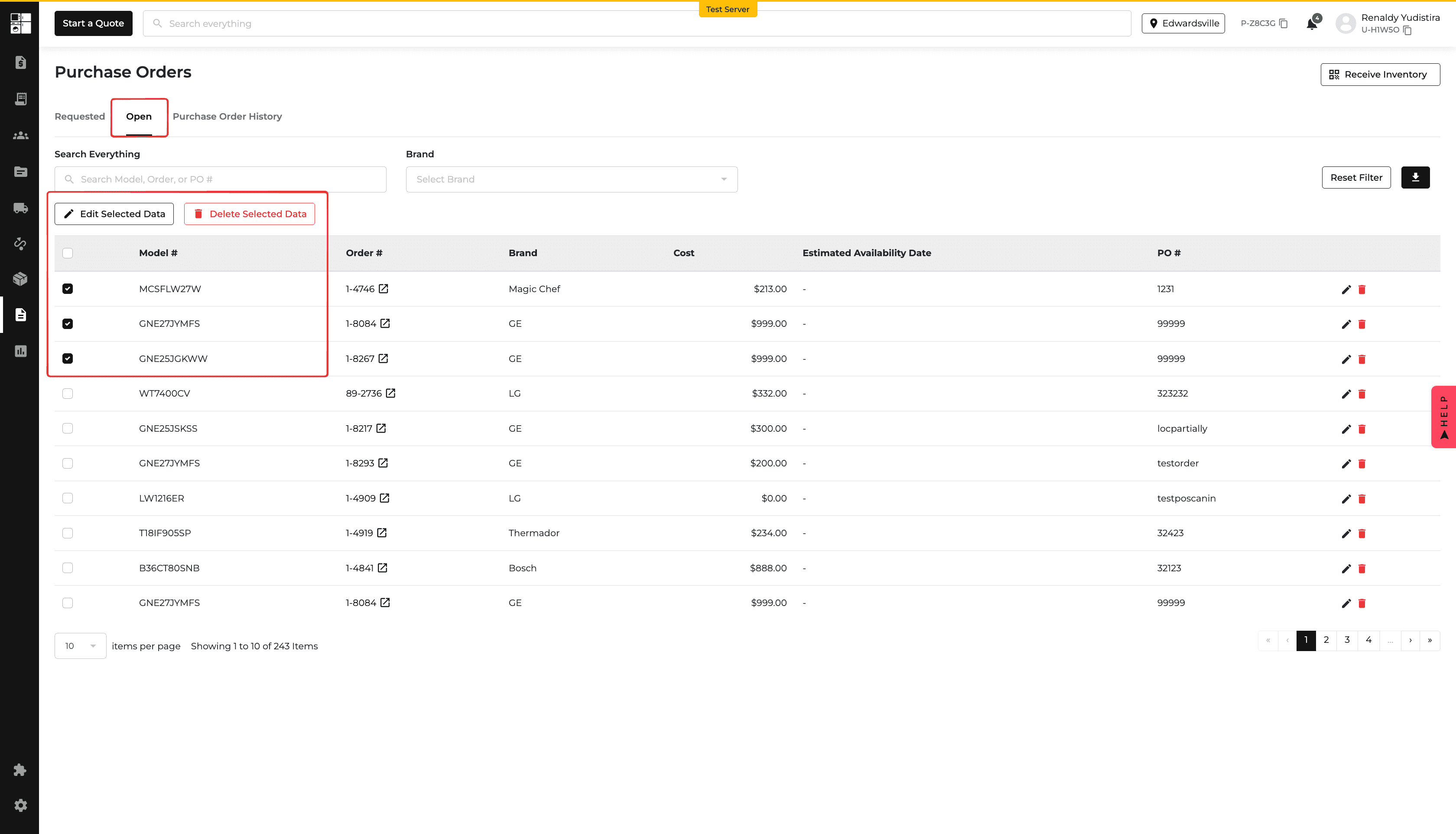
🎉 New Features & Enhancements on the "Open" Tab!
Managing purchase orders just got even better! With new features to streamline tracking, editing, and deleting, you'll save time and avoid mistakes.
🚀 What's New?
✅ Auto-Move to "Open" Tab – When you order a previously requested product, it will now automatically appear in the "Open" tab. No more manual tracking!
✅ Powerful Search Function – Find exactly what you need using the search box! Search by Model Number, Order, or PO# instantly.
✅ Easy Data Export – Need a report? Export your data in CSV or Excel with just one click.
✅ Smart Deletion Options –
Delete Unreserved Products – Only products that haven't been reserved can be deleted.
Bulk Delete with Confirmation – Select multiple products and delete them all at once.
Undo Accidental Bulk Deletion – Made a mistake? A red alert 🚨 lets you undo your bulk delete within 10 seconds.
✅ Bulk Edit Made Simple – Select multiple products and edit Cost, ETA, and PO# in one go—no more manual updates one by one!
✅ Brand Filtering for Faster Navigation – Use the new Brand Filter to view orders by specific brands. You can even select multiple brands at once!
✅ Real-Time Updates After Scan-In – Once an item is scanned in, it will automatically disappear from the "Open" tab, keeping your data clean and up to date.
✨ These updates are live now! Enjoy smoother purchase order management and let us know what you think! 🚀🎉

2. 📥 Import Inventory in Seconds!
Manually entering inventory? Not anymore! Now you can bulk upload your inventory using a CSV file—saving time, reducing errors, and making your life way easier.
🚀 What’s New?
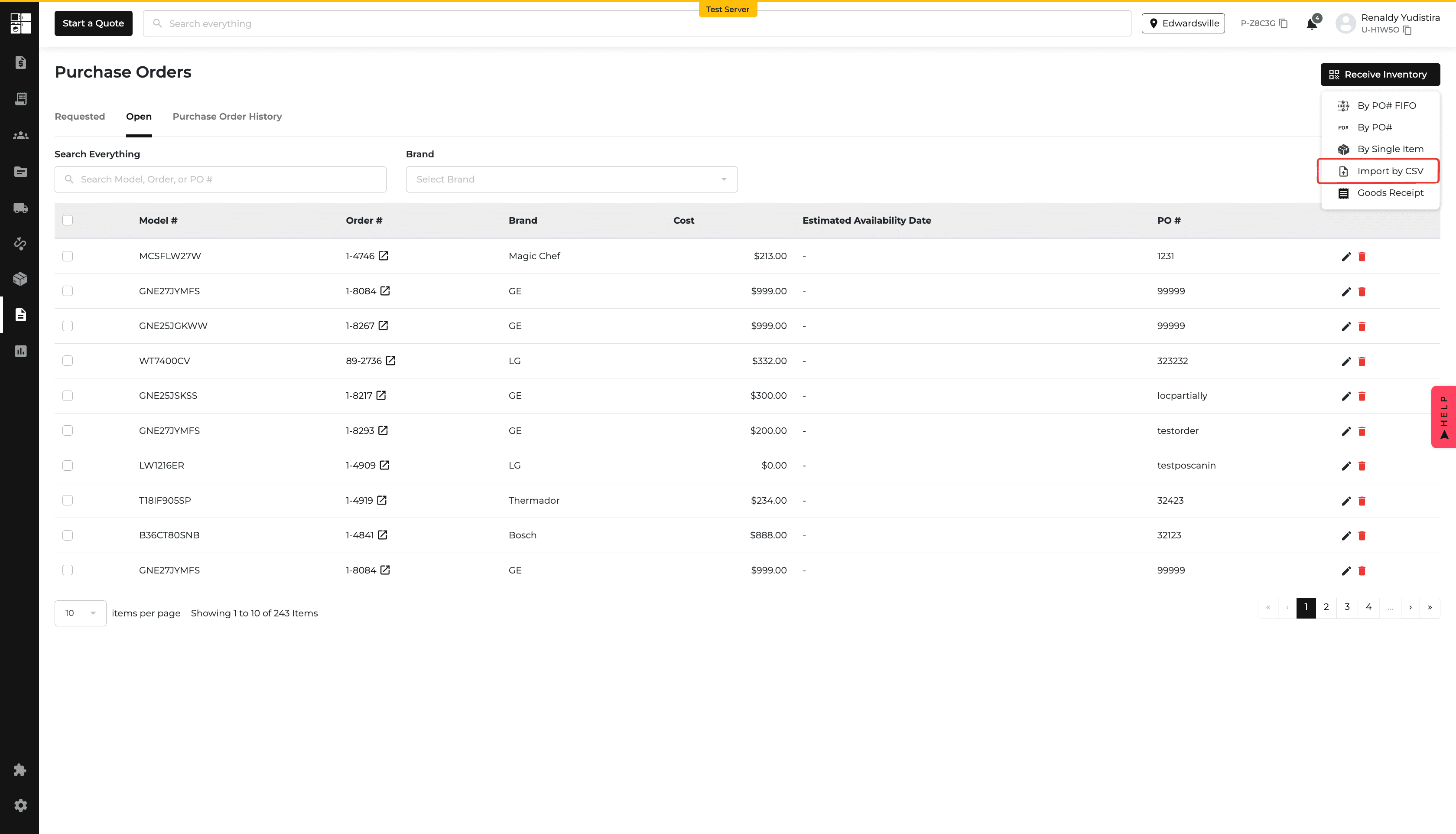
✅ "Import by CSV" Option
Located under the "Receive Inventory" dropdown (top right of the Purchase Order page).
Simply select it, upload your file, and you're done!
✅ Easy Upload Interface
A popup modal will appear when you select "Import by CSV."
Just upload your file—it's that simple!
✅ CSV Format Guidance
A standardized column format will ensure your data imports correctly.
Clear instructions will be provided to prevent errors.
📌 No more tedious manual entry—just quick, easy, and accurate inventory updates! Try it out today! 🚀🎉

3. 🎯 Better Inventory Clarity: Multi-Brand SKU Handling
Ever looked at your inventory and thought, "Sweet, I have 10 units!"—only to find out later that it's actually just 5 shared across multiple brands? Yeah, that’s been a headache. Users were getting tripped up when the same SKU appeared under different brands, mistakenly adding up stock that wasn’t really there.
🚀 What’s New?
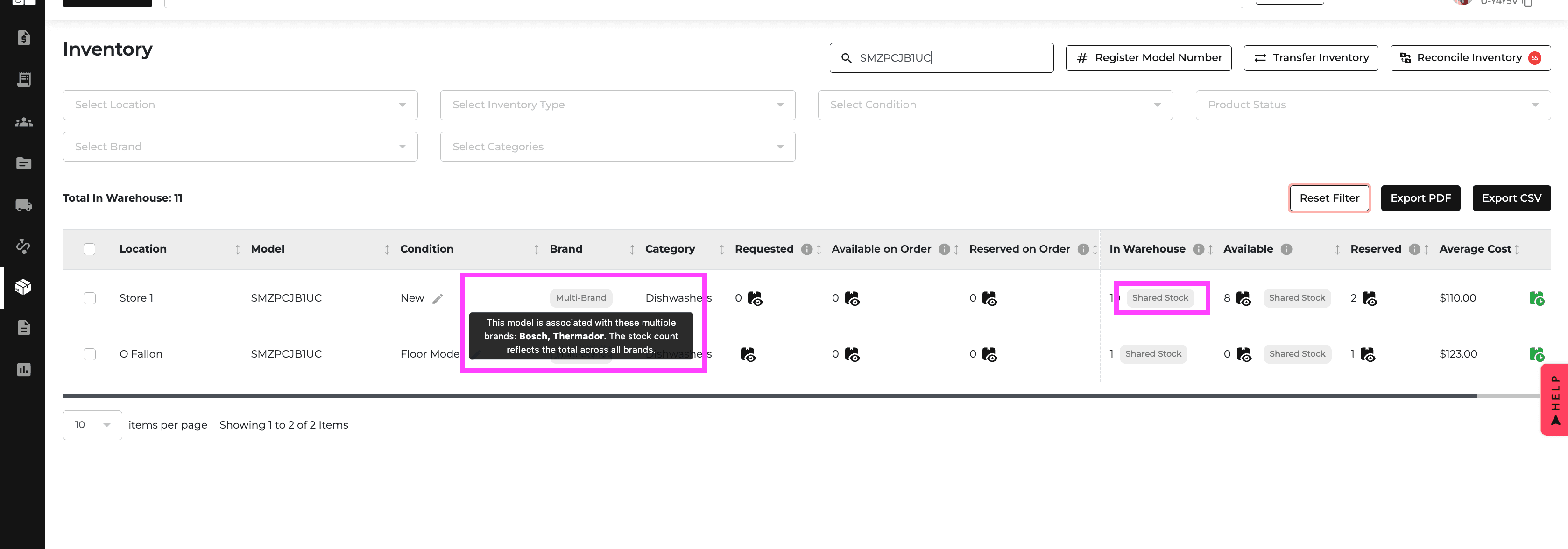
✅ Clear Stock Display – Now, instead of misleading separate counts, we’ll show it like this: "5 (Shared Stock)", so you know the real deal at a glance.
✅ Multi-Brand Warning Bubble – A handy little warning icon next to the Brand column lets you know when a SKU is shared across multiple brands. Hover over it, and boom—you’ll see exactly which brands are involved.
Why You’ll Love It:
No more accidental overselling. No more guessing. Just smooth, stress-free inventory management. 🎉

4. 🛒 Multi-Brand SKU Selection: No More Guesswork!
Salespeople had to manually figure out which brand to use when adding a multi-brand SKU to a quote or order. Picking the wrong brand could lead to mix-ups, mismatched orders, and overall headaches for both sales teams and customers.
🚀 What’s New?
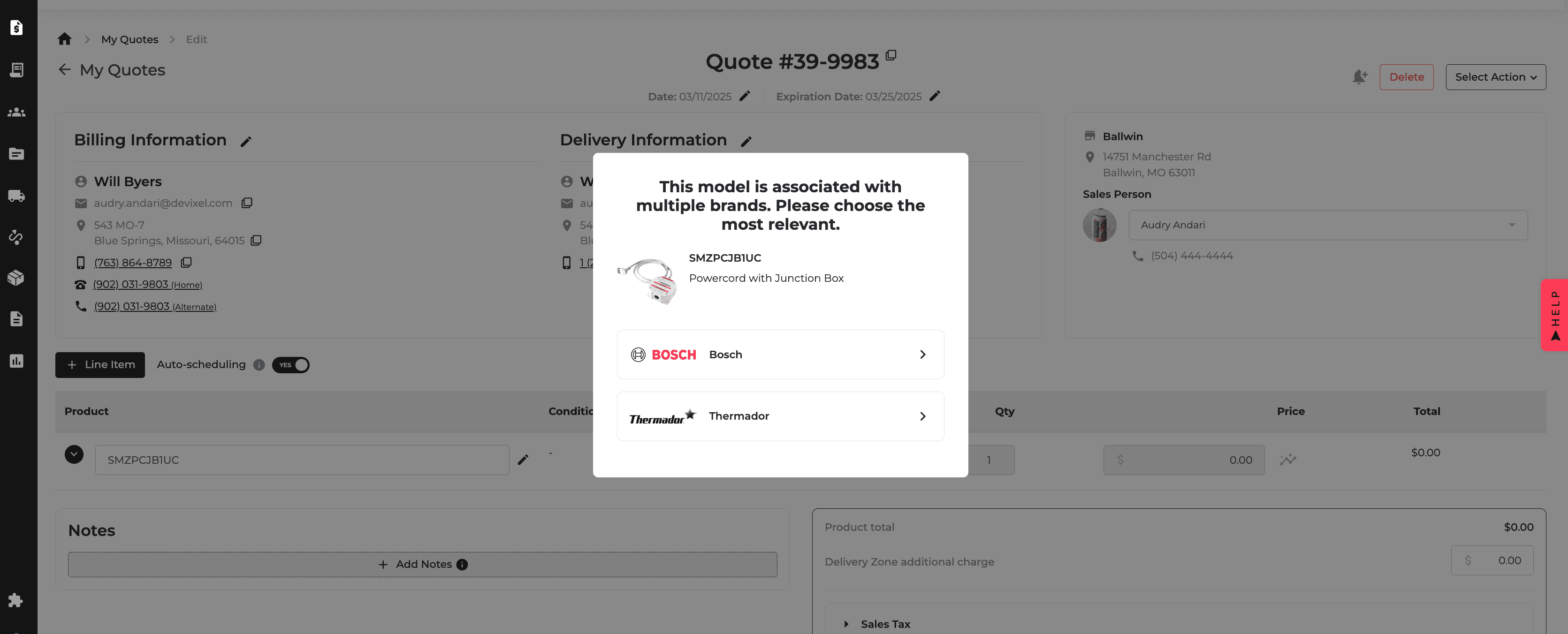
✅ Smart Brand Selection – Now, when you add a multi-brand SKU, you’ll get a friendly prompt to pick the right brand from a list. No more guessing—just a smooth and seamless process.
✅ Accurate Stock Visibility – No matter which brand you choose, the shared stock count is always crystal clear, so you know exactly what’s available.
Why You’ll Love It:
No more mismatched orders. No more brand confusion. Just faster, easier, and more accurate quoting and ordering. 🎯

5. 🚀 Customer Credit Refund, But Better!
We’ve made refunds easier, faster, and way less annoying.
✨ What’s New?
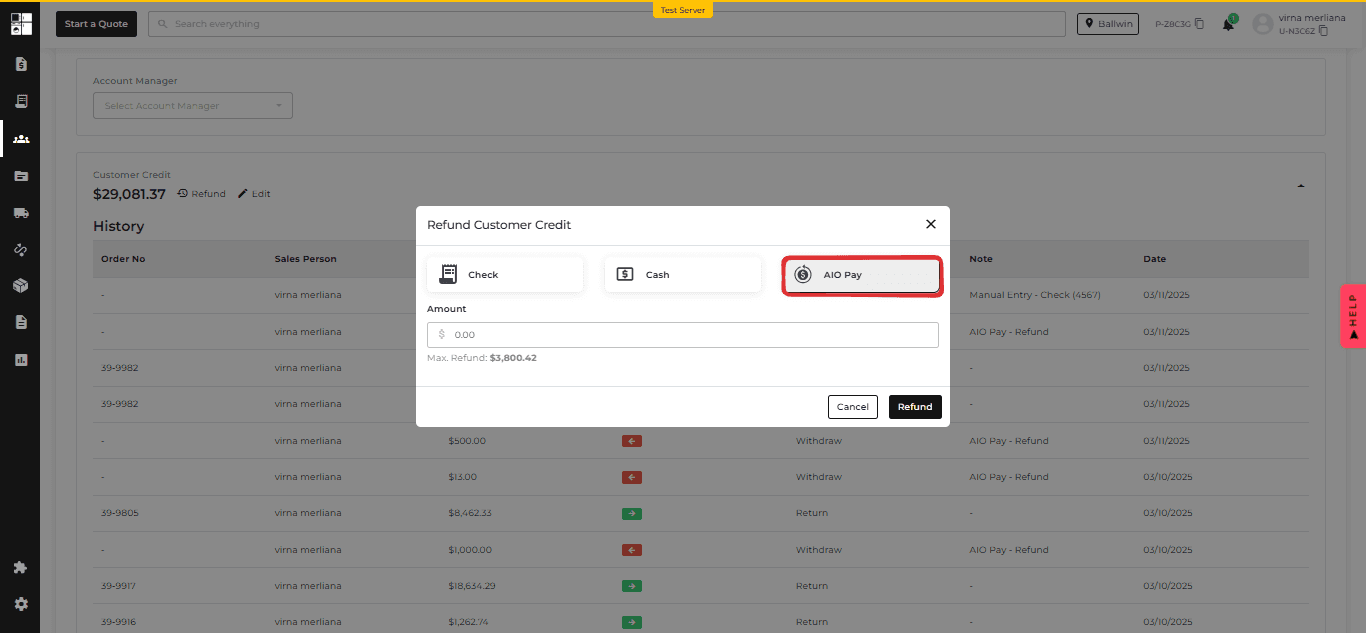
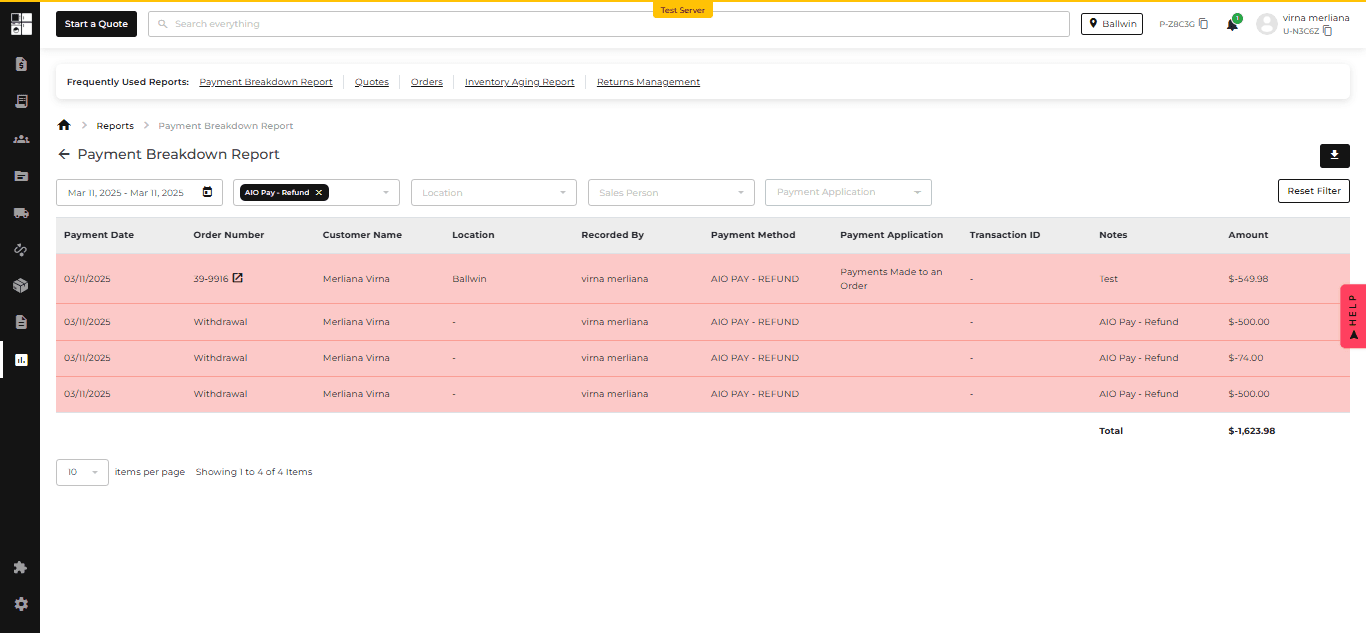
✅ Refund to AIO Pay – No more limits! Customers can now get their refunds straight to AIO Pay. More options = happier people.
🧐 "Total Max. Refund" Box – See exactly how much can be refunded across AIO Pay, cash, and check—no math required!
🚫 No Over-Refunding – You can’t refund more than what was originally paid via AIO Pay (because, well, that wouldn’t make sense).
💡 Why It’s Awesome
Customers get refunds their way.
Less hassle, more happy.
Refunds = smooth and stress-free.
That’s it! Go enjoy those seamless refunds. 🎉


6. 💳 AIO Payments – Now in the Customer Portal!
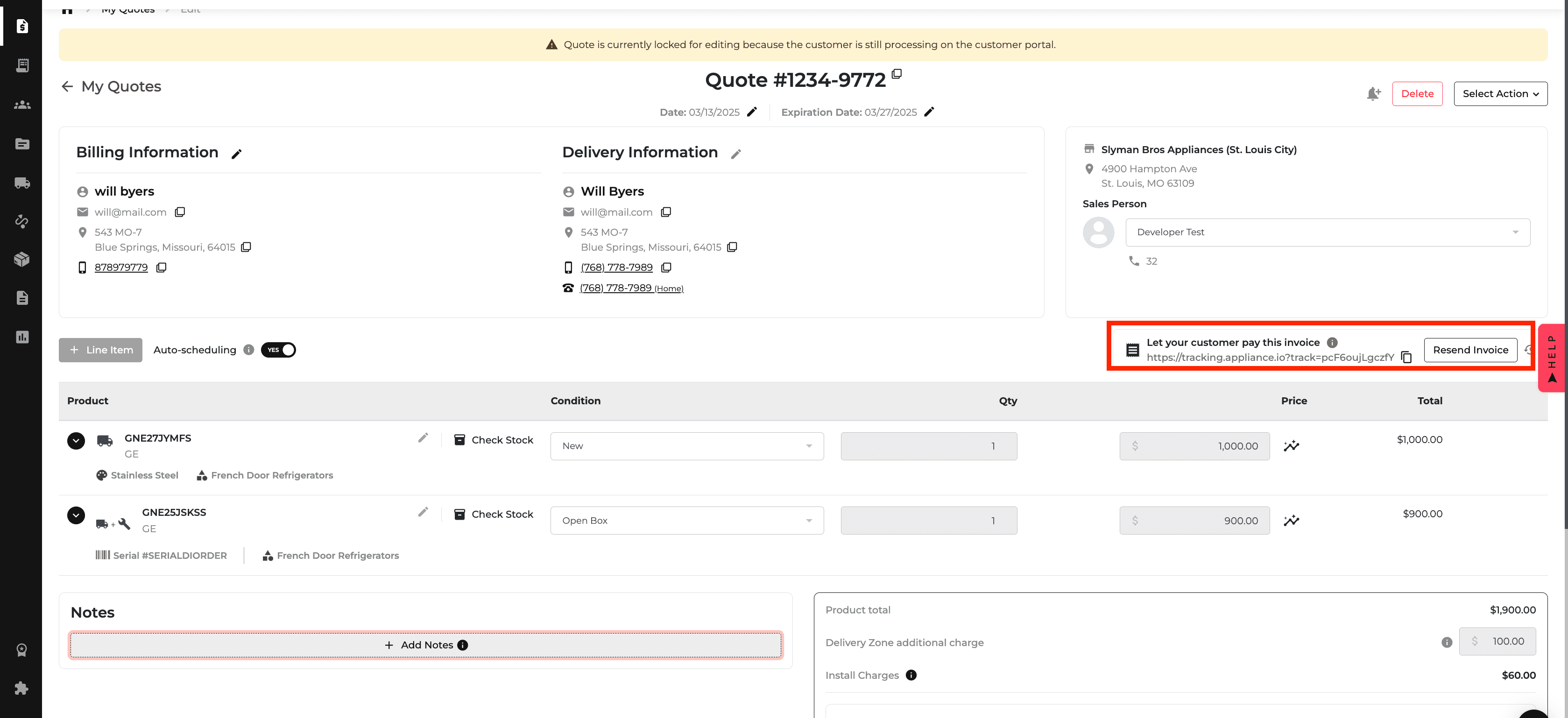
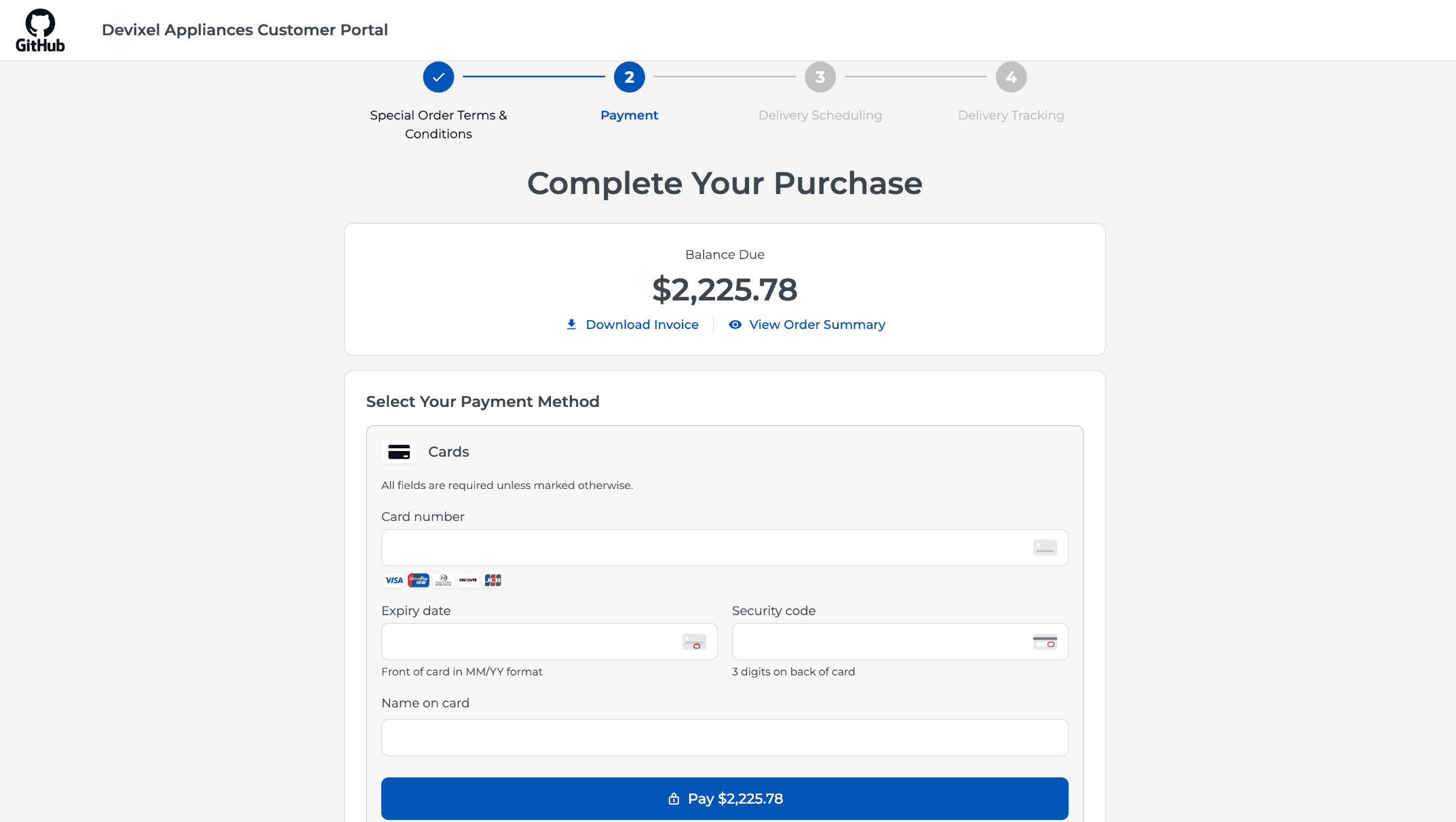
Managing invoices and payments just got a whole lot easier! We've integrated AIO Payments into the Customer Portal, so users can view, pay, and track their invoices all in one place.
🔑 What’s New?
✅ View & Pay Invoices with Ease – See outstanding invoices and orders with key details like amount, due date, and items. A handy payment link makes settling invoices quick and hassle-free.
✅ Seamless Payment Processing – Integrated with AIO’s secure payment API, users can enter their payment info and confirm transactions effortlessly.
✅ Instant Status Updates – Once a payment is made, the invoice status updates to "Paid" automatically—no manual tracking needed!
✅ Smart Delivery Scheduling – After completing a payment, customers can jump straight to the delivery scheduler to arrange shipment for available items.
✅ Sales Team Support – Sales reps can generate and share payment links with customers, making transactions smoother. Plus, real-time payment status updates keep everyone in the loop.
Why You’ll Love It:
No more back-and-forth. No more manual payment tracking. Just a seamless, user-friendly way to manage invoices and payments. 🎉