9 minutes read
Why U.S. Appliance Stores Need Better Sales Tax Support

Katie Bange
Implementation Manager

Appliance retailers already manage enough moving parts in every sale. Product availability, delivery, installation, haul-away, and payment all need to line up before the order is complete. Sales tax should not become another calculation the team has to stop and figure out manually.
The challenge is that there is no single federal sales tax rate across the U.S. Sales taxes are imposed at the state and local levels, with no national rate that applies to every purchase. The applicable tax may vary depending on where the transaction is taxed.
Appliance orders add another layer to this complexity. Beyond identifying the correct rate, dealers must also determine how to treat additional service charges. Separately stated fulfillment fees may be taxed differently depending on the jurisdiction and the order's structure.
When the system doesn't provide sufficient sales tax support, finance teams may end up looking up rates, entering or adjusting taxes manually, and then rechecking the calculation. A better sales tax setup should reduce that repetitive work and make it easier for appliance dealers to apply, review, and manage tax as part of the sale.
When Sales Tax Creates Extra Work for Your Team
Sales tax becomes an operational problem when the system leaves part of the calculation for appliance dealers to finish manually. Finance teams may need to look up the applicable rate, enter or adjust the tax, and then review the order again to ensure the total is correct.
A partially manual process can turn one calculation into two or three rounds of work. A staff member may notice that a rate is missing, question whether the amount matches the applicable tax location. The work takes even longer when different orders involve different tax jurisdictions.
Fulfillment charges can create another source of manual checking. Delivery, installation, haul-away, trip charges, and pricing-zone fees may not always be subject to the same tax treatment when listed separately. If the system doesn't properly support fulfillment-service taxation, appliance dealers may need to adjust the tax outside the normal order workflow.
Appliance retailers do not need to become tax experts. They need a system that can handle more of the calculations in the sales process while still giving appliance dealers enough visibility and control to review or adjust taxes as needed.
How Sales Tax Support Helps Your Team
Better sales tax support can reduce the amount of calculation and correction appliance dealers have to handle manually. For appliance dealers, the most useful support covers several parts of the sales process:
Use the Right Location for the Tax Calculation
Retailers need a system that supports the location basis used in their tax setup, whether calculations are based on the purchase location or the customer's delivery location. Applying that basis consistently reduces the need for appliance dealers to determine the location manually for every order.
Generate Location-Based Rates Automatically
When tax is based on the delivery location, the customer's ZIP code can be used to generate the applicable location-based rates. The tax calculation can include various state and local components, reducing the need for appliance dealers to look up and enter each rate manually.
Include Fulfillment Charges in the Tax Calculation
Appliance orders often include more than the product itself. Delivery, installation, haul-away, trip charges, and pricing-zone fees may also need to be configured as taxable charges within the retailer's sales tax setup. Protection plan tax can also appear as a separate tax component, depending on the retailer's setup. Supporting these different tax components within the same system reduces the need to correct taxes separately after the order is created.
Keep Control When an Order Needs an Adjustment
Automation shouldn’t prevent appliance dealers from reviewing or adjusting the tax when necessary. With a delivery-based tax setup, appliance dealers can edit the applicable tax rates for an individual quote without affecting the tax calculations for other orders.
Preserve Tax-Exempt Orders
Eligible tax-exempt customers should remain exempt when fulfillment-service taxation is applied. Sales tax support should preserve the exemption across supported fulfillment charges rather than requiring appliance dealers to correct the tax manually afterward.
Manage Appliance Sales Tax with Appliance.io
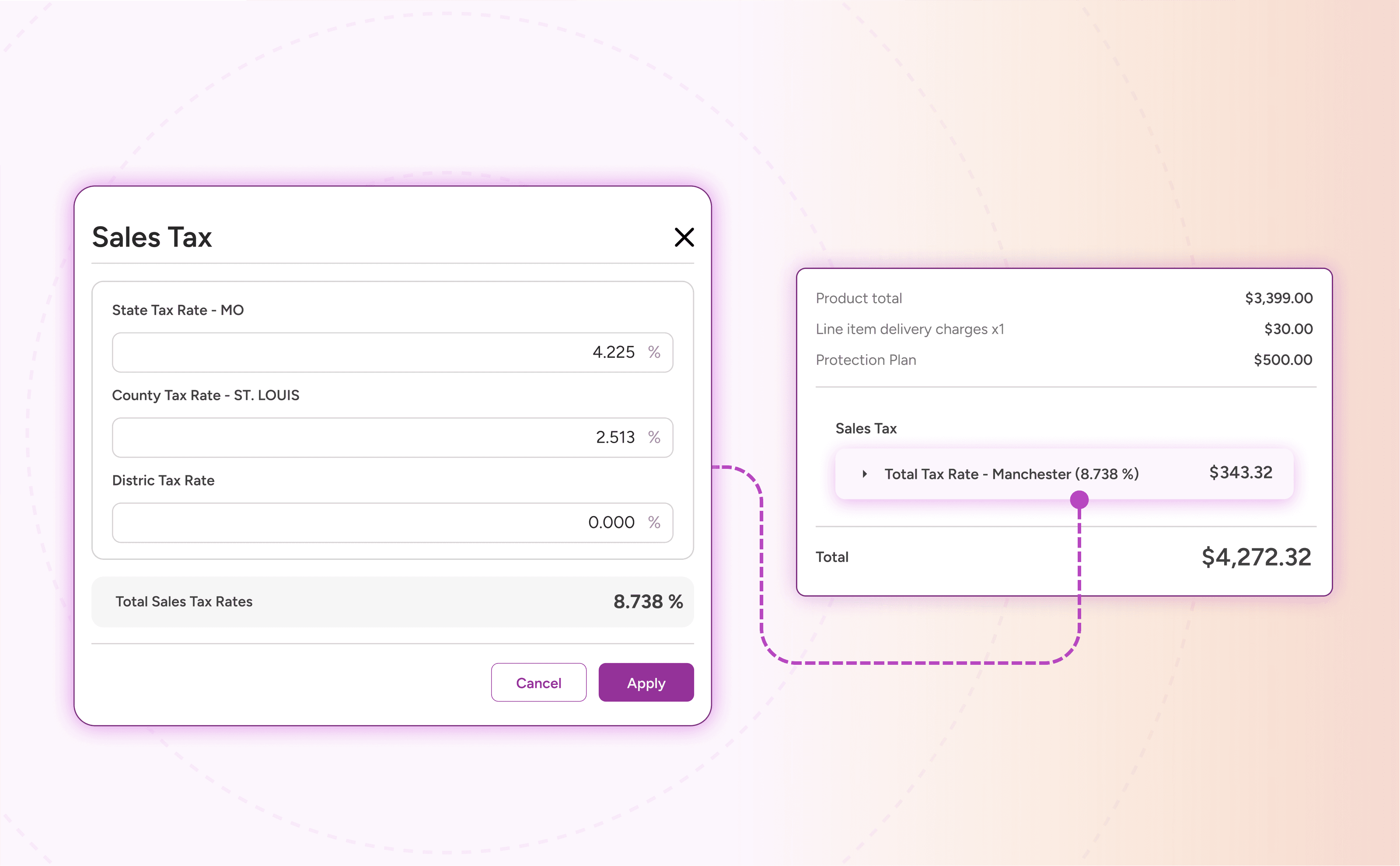
Sales tax support doesn't have to sit in a separate tool from the rest of your appliance business. An all-in-one platform can bring tax management into the same system used for sales, orders, delivery, and other daily operations. Appliance.io gives appliance dealers built-in sales tax tools within the same sales workflow.
Appliance.io supports two ways to determine how sales tax is calculated: Purchase Location and Delivery Location. New dealers default to Purchase Location, but the tax setup can be adjusted based on how the business handles sales and deliveries.
Dealers can also choose whether to charge sales tax on orders delivered to out-of-state addresses. When the setting is enabled, sales tax continues to apply to those orders, with the rate calculated according to the selected Purchase Location or Delivery Location setup.
Purchase Location
With Purchase Location, sales tax is based on the location of the store where the purchase is made. Dealers with multiple locations can manage sales tax separately for each branch, including turning tax collection on or off at the location level.
The tax rate itself is entered and updated manually. If the applicable rate changes, dealers need to update the default tax percentage for that store in Appliance.io. The new rate then carries over to open quotes and orders that have not been fully paid, including partially paid orders. Fully paid orders keep the tax rate that was already applied.
Purchase Location uses a centralized setup rather than per-order customization. Changing the default rate affects eligible open orders for that store, not just a single quote.
Delivery Location
With Delivery Location, sales tax is calculated based on the customer's delivery address rather than the store location. Appliance.io uses the delivery ZIP code to automatically generate the applicable location-based tax rates for the order.
Delivery Location also gives dealers more flexibility at the individual quote level. Through “Edit Sales Tax Rate”, appliance dealers can adjust the tax for a specific order without changing the tax calculation on other orders.
Fulfillment & Protection Plan Tax Configuration
Appliance.io keeps several tax controls in the same Sales Tax on Fulfillment Services settings area, giving dealers more control over how different charges are handled.
Tax Fulfillment Services and Fees: Dealers can apply sales tax to supported fulfillment charges, including delivery, trip charges, haul-away, pricing-zone fees, and installation.
Tax Protection Plans: Protection plans can also be taxed when the associated item is taxable, using a separate setting from fulfillment services.
Override Tax on Individual Line Items: When enabled, appliance dealers can mark a standard line item as taxable or non-taxable directly from the quote page when an order needs an adjustment.
Disable Built-In Appliances Tax: Dealers can also disable the built-in appliance tax when needed. Because appliance tax exemptions vary by state, the setting should be used in accordance with the applicable local tax rules.
With those controls in place, sales tax becomes easier to manage as part of the same workflow your team already uses every day.
Ready to manage sales tax with less manual work? Book a demo to see how Appliance.io can support your workflow.
Need help understanding which sales tax setup is right for your business? Contact the Appliance.io team for more information.